June 5, 2017
Comparing Creative Software
I am not a professional graphic designer, but I do use photo and design programs quite a bit for every day tasks like photo retouching and vector image creation. I've been and will continue to be a supporter of open-source software alternatives. But I'm also interested in more cost-friendly commercial alternatives. I'm always curious about new software, especially design related, which is why I was really intrigued to learn about the fairly recent Affinity apps. It's been a long time since Adobe has had a serious commercial competitor (RPI Macromedia). But that day may have come with the arrival of the Affinity set of creative applications. I've been trying them out, and so far I've really impressed. So, I compared both Affinity apps with their Adobe and open-source counterparts.
Note: Affinity is a line of design software from Serif, a software company based in Britain that has been producing Windows-based software for quite awhile. It seems they're going through a serious re-branding with the Affinity brand, focusing equally on Mac and Windows and trying to be a real challenger to Adobe. Technically they are, but practically they aren't.
Illustration/Vector Editing
To compare the features of the illustration applications I used each to create a really simple image of a candy bar with the wrapper partially missing, and a bite taking out of the chocolate, as well as a little bit of drop shadow to give it a slight 3D effect. I did this to demonstrate the similarities of the three applications in what they are capable of creating.
If you were to ask me what are the two most important features of Illustrator, I would say they are the pathfinder and the pen tool. Also the transform and alignment functions are critical. Each of the three applications have these tools, although they have slightly different names. Googling solves most confusions where feature names are different from one application to the next.
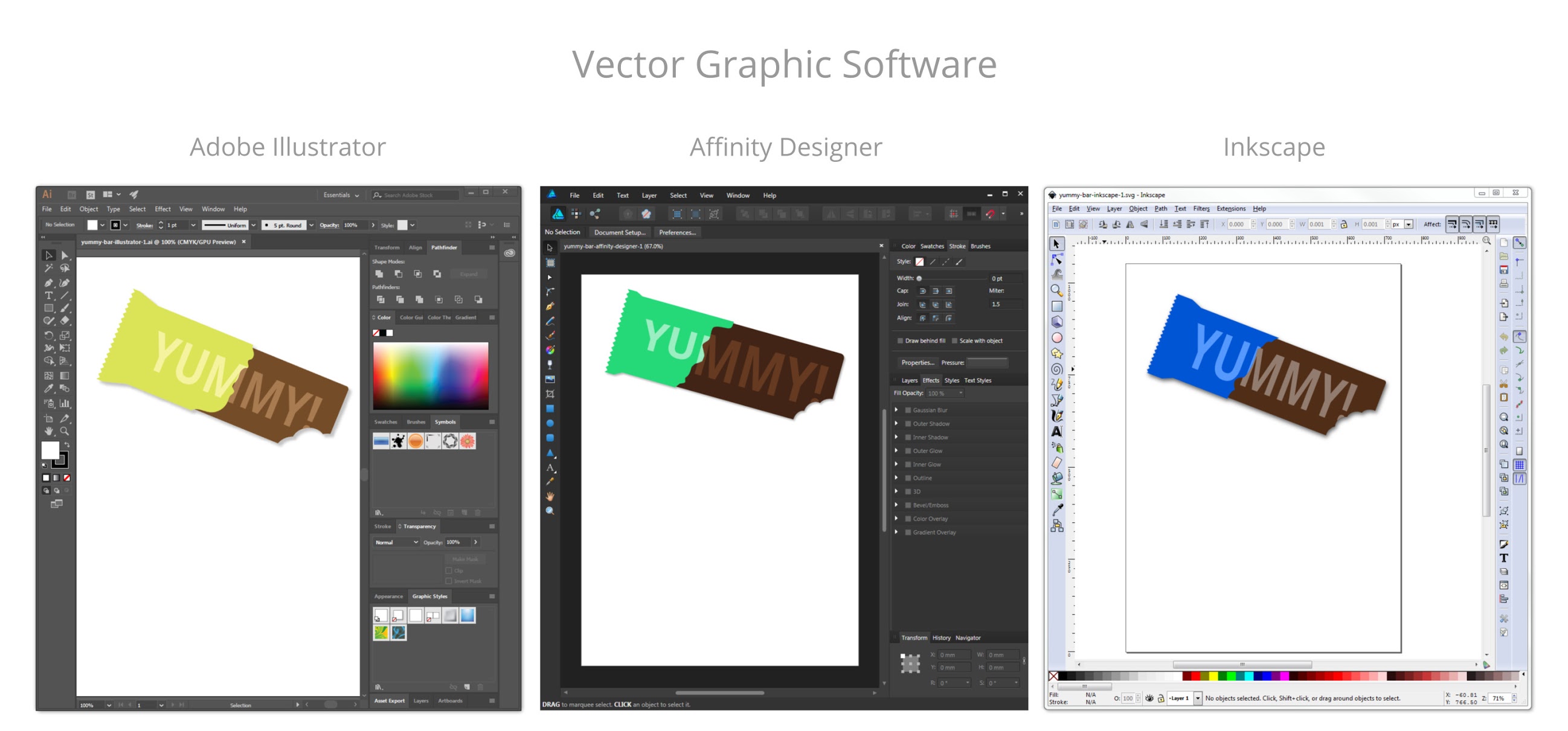
I intentionally tried not to make them look exactly the same to demonstrate that each is unique, but I used the same processes all three times. I could just as easily made the exact save version with each app. The tools I relied on most are the pen tool, the pathfinder feature, the node selector, and the linked offset feature.
One major advantage both Inkscape and Affinity Designer have over Illustrator is file size. It's quite shocking how much larger Adobe files are, even when saved as svg without Illustrator editing capabilities preserved (brings it down to around 800 KB).

Retouching/Raster Editing
There are some things that GIMP does out-of-the-box that PhotoShop cannot even do without a plug-in, such as creating and editing ICO files (favicons). The more recent editions of GIMP offer a single-window UI which is much closer to Photoshop. Although the names of things are a bit different in GIMP from Photoshop, a little playing and/or Googleing can help you quickly identify how to do all of the same tasks

After spending a week testing out Affinity Photo I'm pretty impressed with how close it resembles Photoshop. I really like that the keyboard shortcuts are the same. For example, I can't tell you how often I use Cmd/Ctrl+Alt+I to open the dialog to scale an image. Or Cmd/Ctrl+Shift+C to crop an image. This works the same in Affinity. Just an example of how easy it is to transition from one program to the other.
Importance of Workflow
Aside from the abundance of features that Adobe offers with it's creative cloud, it's iron-clad grip on the creative industry is really it's most important attribute, by which I mean your ability to collaborate with other designers, almost all of whom use Adobe products
Most professional designers I work with would not take anything other than Adobe seriously. From their logical point of view: why would they bother learning a new set of tools when they can stick with what they know, and what is the industry standard. Of course, most of them don't have to worry about affording the software as their employer typically foots that bill
I've read or heard a lot of reviews for Affinity that rave about it's capabilities and price, but relay that what matters most is really the software skills someone has when working with a team. So if you can't blend into a team that uses Adobe products, you skills no matter how amazing are irrelevant. Others argue that its really your ideas that matter, and as long as you can use whatever tools are provided to accomplish the same thing, it makes no difference. The key is, even if you make use of Affinity software, if you want to collaborate in the design world, you need to know how to get things done using Adobe products.
The Final Verdict
Definitely give Affinity software a try! The combination of capabilities and cost make it a no-brainier. You can do the same work with any of these tools. Affinity has all of the most important capabilities. It's backed by a small but dedicated company with a lot of experience, so you'll get a lot of benefit from that support. When ever I had a question on how to do something, I can usually find a post of the Affinity forum that provides an answer
If you're a pro graphic designer you'll probably not be swayed or able to switch away from Adobe. If you're a web designer/developer who doesn’t necessarily always need access to Adobe they you could really find Affinity to be a great and much-less expensive alternative
Here's a few things that I think could help Affinity:
- Extend your free Trial. 10 days is kind of a short evaluation time. Even Adobe gives you a month.
- Make a license user based, and OS-agnostic. With Adobe a user can download and install on multiple OSes. I shouldn't have to pay for both a Windows and Mac version of the same program.
I will always continue to recommend the open-source options. With GIMP and Inkscape you have all of the most important functionality that Photoshop and Illustrator offer, as do Affinity Designer and Affinity Photo, but with open-source it's 100% free, and supported by a big community of open-source enthusiasts! Affinity's advantages are getting support from the company, and having a more polished-looking UI, and being a great low cost but familiar and functional alternative to Adobe.
Labels: Affinity, Front-end Development, GIMP, Graphic/web design, Illustrator, Inkscape, Open Source, Photoshop, web development


February 11, 2017
I Just Discovered BrowserQuest
This is cool! I discovered BrowserQuest, a game that runs in your browser, developed for Mozilla by Little Workshop. It's a pretty fun little RPG style game with a few references to other video games and pop culture hidden within the game. It is built entirely with HTML5 and JavaScript. And by using WebSprokets technology it is able to be a massive multiplayer online game. Pretty impressive! The functionality is awesome. The graphics are fantastic. I really like everything about this game, but they took it another level and added a wonderful homage to Portal, my favorite video game!

Labels: Graphic/web design, HTML5, Open Source, portal, video games, web development
June 15, 2016
Open Source is Awesome

Why do I love open source software so much? Because it enables creativity. You don't have to have access to expensive software licenses to unleash your inner creative potential. I've been a big fan of Open Source Software ever since I first discovered the original Open Office software in the early 2000s. Open Office was capable of nearly everything I needed from an office/productivity suite of tools, and was compatible with Microsoft formats.
I also feel that the more tools you know how to use, the more overall capability you have, thus encouraging intellectual curiosity, a trait that is sought after in the technology world. Just like a master carpenter tends to have many tools that they may use for a specific purpose, the more design tools you have experience with, the more well-rounded of a designer you will be.
you can do nearly anything with Open Source software! Working in the creative world, its truly difficult to get by without access to a subscription to Adobe Creative Cloud (which until not too long ago was the Creative Suite) since it's the industry standard, and there are a lot of great features that make Adobe a logical choice. But if you're just interested in exploring your creativity, you can find an open source program that matches nearly every component of the Adobe Creative Cloud.
Office Software – don't waste you money buying MS Office. You can do just fine with Open Office software. Right now there are two prominent choices: Apache Open Office, and Libre Office (I prefer the latter). This is because the original Open Office software (which I have been using for over 10 years) which was developed by Sun Microsystems, was forked into two separate products when Oracle acquired Sun. The Document Foundation has been more actively developing Libre Office.
Web Design/Development – Coding – Now there are an abundance of execellent text editors to code with, as I have mentioned in a previous blog post. I recommend Notepad++ and Brackets for raw text editing greatness. If you need a What-You-See-Is-What-You-Get editor, try out Kompozer or N/Vu (which is what I learned with).
Blender – 3D modeling, video editing—I was recently working on updating my portfolio site JhuffmanDesign.com and thought it might be cool to add a video background on the homepage. I needed a way to splice some video I made. I did a LOT of research, and it turns out Blender is the best open-source video editor out there. I also used the open-source VLC Player to edit the video format and save for web. VLC Player plays pretty much every video format imaginable. Blender is the best open-source video editor available, and VLC Player is the best open-source video player available.
Illustration – Inkscape is one of my favorite tools. It's perfect for logo design, map making, wire-framing, or really any soft of vector-based graphic design. It's very similar to Adobe Illustrator although it does not come with any of Illustrators frills such as the many brushes. But if you're savvy, you can recreate those features using Inkscape. Try it out.
Photo Editing – GIMP (or GNU Image Manipulation Program) is a great raster image editor. It's perfect for doing the kinds of things you would normally use PhotoShop. The tools have different names, and the UI is not as pretty as PhotoShop, but it gets the job done. GIMP can even do some things that PhotoShop cannot do, such as save nativity as multi-layered ICO files.
Desktop Publishing – if you've worked in desktop publishing then chances are you have used InDesign. It's great for putting together larger documents with different page layouts, importing images files, etc. Scribus is the open-source equivalent of InDesign, it's what you use to pull it all together.
You don't have to spend a dime to have all the tools you need to explore your creativity! Read about more Open Source Software tools here.
Labels: Blender, Brackets, GIMP, Graphic/web design, Inkscape, Notepad++, Open Source, technology
January 24, 2016
Tiny Computers
Just a couple years ago a charitable organization was formed in the UK with the goal of creating small, affordable computers, to make hardware more accessible for those interested in learning to build/code. This movement just happens to coincide nicely with the development of smaller processors and electronic components needed for smart phones and all of the increasingly smaller devices in our lives, and with that comes a convenient surplus of available tiny hardware.
Their creation, the Raspberry Pi, is a credit card-sized circuit board with a CPU, RAM, and multiple ports for accessories – basically a computer the size of a deck of cards that costs under $30.
Since the original Raspberry Pi there have been several new releases with updated specifications. The Pi 2 includes a gig of RAM, and faster quad-core CPU. It's actually more powerful than the first computer I ever purchased, which ran windows 98, despite the fact that I could fit the Pi 2 in my pocket. Even at it's tiny size, the Pi can run older Windows, as this video demonstrates,. But it's much better suited for operating systems tailored to its configurations, such as the version of Linux released by the Raspberry Pi foundation.
There is a free slimmed-down version of Windows 10 (Windows 10 IoT Core) available for the Raspberry Pi 2, and paired with the Microsoft Hololens Augmented Reality headset allows you create some pretty amazing things. Learn more about Windows 10 IoT Core here, and get it here.
The Raspbery Pi Zero is a smaller version of the Pi with only the bare essentials, and not much larger than the circuit board itself. It's about the size of a thick business card and could easily fit in a wallet, yet it has the same computing power of the original Pi.
Initially intended as an educational device, the affordability and extensibility of the Raspberry Pi make it a device with nearly limitless possibilities. And with the ever growing Internet of Things (IoT) there will be increasingly more and more ways a Pi, or similar small computer, can enhance our lives.
Other folks have taken notice, and there is an increasing number of Raspberry Pi competitors out there, including C.H.I.P. which is basically a slimmed down Raspberry Pi that costs only $9. And just yessterday I read about a Kickstarter campaign for the Pine64, a more powerful competitor to the Raspberry Pi that runs on a 64 processor, has 4K video output, and can run Android OS, all on a board slightly bigger than the Pi 2, and only costing $15. It blew it's Kickstarter goal out of the water. So it's likely we'll continue to see an explosion of small computers supporting the IoT.
Labels: Open Source, tech, technology
October 10, 2015
Web Design: Comparing Text Editors
If you're interested in learning to code for the web, there are some excellent editors available now. I'm going to talk about four of them: Notepad++, Sublime Text, Atom, and Brackets. The latter two I only recently discovered.
All you need to build a website is a simple text editor, such as the one bundled with your computer's operating system. Notepad on Windows, TextEdit on Mac, or gEdit for Linux will do just fine. If you're serious about coding you should consider trying a more advanced text editor that helps make coding more intuitive. A good text editor is worth it's code in gold. (But note, the four options I describe below are either free, or low cost).

Clockwise from top left: Notepad++, Sublime Text, Atom, Brackets.
Text Editors vs WYSIWYG Editors vs IDEs
Before I get into text editors I'd like to point out that in the world of web authoring there are primarily three kinds of tools often used: Text editors, WYSIWYG (What You See Is What You Get) editors, and IDEs (Integrated Development Environments). IDEs manage the whole process of web site management from editing the code, to managing the files locally, to uploading to a web server.
Labels: Graphic/web design, Open Source, web development